Monday, May 5, 2014

Phablet War: Samsung Galaxy Note 3 vs LG G pro 2!

The LG G pro 2 is a great device but is it good enough to defeat the king of the phablet line? Without wasting your time,  Let's find out which is the best phablet in this indepth comparison of the Samsung Galaxy Note 3 and LG G pro 2!

      Samsung Galaxy Note 3 vs LG G Pro 2


DESIGN AND BUILD.

If you are a Metal body lover, you are going to be disappointed here as both the devices feature a plastic build which is not really that great!


Both feel solid in the hands, but the Note 3 offers a little more grip, thanks to its faux-leather textured back. Opinion on Samsung's fake stitching is split, but some people will find it a little bit too tacky for their tastes. 

Samsung Galaxy Note 3 vs LG G Pro 2On the other side, the G pro 2 looks like the streched version of the LG G2 with the same button layout on the back which can take time to get used to but fortunately you can also unlock your phone by tapping the display.

The G pro 2 also features those LG slim bezels that look gorgeous and can be considered as a pro!

But choosing winner here is quite difficult as both the phones have something that the other just misses. The Galaxy note 3 has a better grip while the G pro 2 looks better. So, it is up to you here which one to choose.


DISPLAY.


Both the phones rock the 1080p resolution that looks great on either device.


Despite each stretching a 1080p resolution over more than 5 inches of screen, you'll have no sharpness complaints. Obviously the fact that the LG has the bigger display - 5.9in to the Samsung's 5.7in - means it has a slightly lower pixel density (373ppi versus 386ppi) but the difference is unimportant in daily use.

The important factor to look out for here is the Tech used for the display.

The Note 3 sticks to Samsung's preferred Super AMOLED tech, which means deep, true blacks and vivid colours. LG has instead retained the G2's IPS+ LCD screen; LCD displays tend to serve up purer whites and more realistic colours than their AMOLED counterparts.

While I do appreciate the Full HD display of the Note 3, colours on the G pro 2 look much more realistic in real life.

So, the winner here is the LG G pro 2.


HARDWARE.

Both the phones come with all the connectivity options and micro SD support, so you won't really have a problem in storage on either device.

Samsung Galaxy Note 3 vs LG G Pro 2 - Other features 2But the one place where the Galaxy note 3 gets an advantage is the Stylus availability! Sure you can buy stylus from another source for the g pro 2 but it won't be deeply integrated in the OS and you miss all the Features that it brings with it.

On the battery side, Both the devices surprisingly come with a 3200mAh removable battery but they don't quite match up in the battery life.

While both the phones can get you period of a 1.5 days on little heavy usage, the Note 3 gives you a little more hours when we compare them together.


SOFTWARE.


Here, we have again two different android skins with different benefits and it won't be easy to choose one!

When we talk about the android versions they come with, the G pro 2 already comes with the Android kitkat while on the note 3, you get Android 4.3 jellybean which can be updated to android kitkat.

Whereas on the Skins department, both come with highly customized skins of their own and Both have their own quarks.

The Note 3 gets Samsung's TouchWiz interface in all of its cartoony glory, and if you can manage to forgive it the garishly in-your-face design it has plenty of nice features.


        Samsung Galaxy Note 3 vs LG G Pro 2

Probably you won't use this features after a while but as I am supposed to mention them, they include: a FlipBoard-powered stream of all your news and social updates which is not quite rapid and you would probably end up using Flipboard again; 

MultiWindow, which lets you view two apps simultaneously; a shrunken down display option for one-handed use; Smart Rotation, which automatically adjusts the screen's orientation to match that of your face; Quick Glance, which lets you wave your hand over the Note 3 when it’s locked to summon notifications; Story Album for arranging your snaps; S Health for tracking exercise.


Samsung Galaxy Note 3 vs LG G Pro 2On the G pro 2 however you get the popular KnockCode, The ability to customise shortcuts for the front touch buttons is also welcome, as are Smart Stay (which keeps the screen on while you're looking at it), Content Lock (which sets a second password for specific photos, videos and notes) and Dual Browser, which pretty much does what the Note 3's MultiWindow does. 

Slide Aside - which lets you access frequently used apps with a three-finger swipe - merely annoyed us a little. Oh, and like the Note 3 there's a Mini View mode which shrinks the display down so you can use it easily with one hand. Unfortunately, it won't shrink the handset at the same time.

The Winner here is also totally up to you with both coming with a features rich software and you won't regret choosing either.


PERFORMANCE.

Now when it comes to performance, both phones are great performers whatsoever.

The G Pro 2 and Note 3 both have identical quad-core Qualcomm Snapdragon 800 brains, along with 3GB of RAM to help them run hordes of apps simultaneously. These processors don't really sound the latest but they are not bad and can run anything hands down!


You won't really have a problem on either device and will have a lag free experience.

CAMERA.

Both the Note 3 and G Pro 2 have 13MP rear cameras. Both devices can record 4K video at 30fps, 1080 video at 60fps, and slow motion 720p video at 120fps.

Both really look same on paper but that's not the case in real life.

     Samsung Galaxy Note 3 vs LG G Pro 2

Both phones no doubt capture great images in good and sufficient light but the challenge comes in low light.

Samsung Galaxy Note 3 vs LG G Pro 2With the OIS+, the LG G pro 2 captures great ( acceptable ) photos in low light with lesser noise and less grainy images. While on the other side, there is no OIS at all on the Note 3 and it's camera is no good in low light!

Like the Galaxy S5 and HTC One (M8), the G Pro 2 also lets you refocus on different parts of a shot after you've taken a photo. LG calls this Magic Focus, and in use it works pretty well. To get the most from it you'll need plenty of space between foreground and background - not to mention steady hands - but it's a nice feature to have. 

In the camera depart, LG G pro 2 clearly wins with better shots in all light conditions.


TO SUM UP..

Both the phones are a great deal in all aspects but on the LG G pro 2, you get better camera, screen and more premium build but on the Note 3, you get the S pen, a little better battery life and more importantly a cheaper price to pay!
Decision is on you now which one to choose as you know all the pros and cons.


Read Also: LG G Pro 2 review, Note 3 killer?


ONCE AGAIN THANK YOU FOR READING, IF YOU HAVE ANY MORE SUGGESTIONS OR QUESTIONS ON THIS ARTICLE , COMMENTS ARE ALWAYS WELCOMED OR YOU CONNECT ME ON TWITTER@phonesoldier or Facebook!
 DO MAKE SURE TO HIT THAT SHARE BUTTON IF YOU LIKED READING IT! 

Sunday, May 4, 2014

LG G Pro 2 review, Note 3 killer?

7:05 PM Posted by phonesoldier , , No comments
The LG G PRO 2 as expected was launched at the MWC 2014 and a few days back, it was launched in India with the price tag of 50k competing with the Samsung Galaxy note 3 and the HTC one max. The specs of the LG G pro 2 as you would expect are top notch with no flaws whatsoever so what is in this phone that you should buy it for and ditch the others? Let's find out!


DESIGN AND BUILD.


The g pro 2 is a big device to carry as it is addressed as a phablet, not a normal phone but what concerns the customer or any mobile user is how the phone feels in the hand and is it comfortable or slippery?
The g pro 2 looks gorgeous at first glance but there's more to look out, The first thing you'll notice is that the bezel sparkles, thanks to a glitter-like paint that LG refers to as "pearl." The paint is featured on the black and silver models, but not on the white version, so you might wanna avoid the white version as those pearls look great!on the back, we have a polycarbonate textured finish whose mesh pattern is so fine that it feels like a thick canvas. But it looks great as you would expect and doesn't really attracts dust or sand as I feared!


The phone looks good but is not particularly comfortable to hold, the texture is a little slicker than it would have been if it were made of rubber or some sort of soft-touch material, and the actual edges of the phone are only 4.1mm thick at its thinnest point, which made it too easy for my fingers to slip off. I really want a big phone like this to be comfortable to hold all the time as you would probably use it for long time for gaming and other things that you would do on a big screen phone!


Speaking of finger placement, the back of the phone is completely flat, with the exception of a steep slope around the edges and back-mounted buttons, which were designed to be easy to reach even when you're using the phone one-handed which is nice once you get used to it especially on a big phone like this!
The design and build of the phone is great and looks much more premium that it's competition, not really comfortable but it is nice and you won't have any problems with it.


DISPLAY.


LG G Pro 2 rocks a 1080p Full HD IPS panel, which means it has the same resolution as the original G Pro. Unfortunately for pixel density lovers, this means fewer pixels per inch -- 373 vs. 401, to be exact. Arguably, this small difference in density doesn't make the viewing experience visibly worse unless you're looking at the two side by side, but we expect that most people would rather sacrifice a few pixels per inch for more screen real estate. We'd add, too, that the display itself is easy to see in the direct sunlight when it's cranked up above 80 percent brightness. Likewise, the viewing angles are great too.

Bottom line is the display is gorgeous and is a pleasure to look at whether you are watching movies or playing high definition games.


HARDWARE.


The device comes with all the connectivity options out there including NFC, Bluetooth v4.0 and basically everything you can think of.

This phone even comes with the HDMI port which is a nice addition if you want to show your media on a bigger screen!

When it comes to storage, the device comes with 16/32GB internal storage which the ability to increase the storage via a micro SD card up to 64GB for movies or anything else like the 4K videos you will be recording on this phone.

Underneath that back cover, the phone is running on a 3200 mAh REMOVABLE battery which will talk about later in this article.


SOFTWARE.


The g pro 2 ships with the android kitkat 4.4.2 with the not-so-great LG's UI that is not really appreciated by many but it is still untouched with few enhancements on this device.

The phone includes the popular KnockCode of LG that lets you unlock your device by tapping in different patterns on the display which sounds a little damaging but is not. The success rate of you passing the KnockCode Is actually only 80% but it is still a great feature to have.


With the new G Pro 2, LG's introduced a new feature called Mini View designed to make one-handed use a little more feasible ( really a must on a 6-inches device) . In truth, Samsung already does something similar with the Note 3, but the implementation here is different. Swipe left or right on the navigation bar at the bottom of the screen, and the interface will shrink into a 3.4-inch window that you can move around and even resize (it goes up to 4.7 inches).


Meanwhile, there are plenty of options for those of you who enjoy the extra screen space which you should be as you are paying a lot for it! Dual Browser is LG's version of the Galaxy Note's Multi Window, which lets you view more than one app at the same time. Hold down the back button to bring up a small menu of apps, and you just drag apps to either side of the screen. There's also QSlide, a suite of apps that appear as floating windows. While hovering over the rest of the screen, you can choose to make them as transparent as you'd like in order to make sure they're not distracting you when you need to focus. It is not as laggy as on Samsung's phones but it still freezes sometimes.


The G Pro 2 also marks the debut of LG's new Content Locker feature, which lets you hide photos and other files from view, and the only way to access them is by entering a password. Now you won't have to download third party apps for that!

Finally, LG threw in a few audio enhancements. The G Pro 2 comes with 1W Hi-Fi sound, which, according to LG, offers "studio quality sound" without any loss to the original audio. The idea is to add clarity and improve the high notes, while the speaker setup handles the mid to low end of the spectrum. It is not particularly louder than HTC one or older LG devices but it still increases the quality which is useful when you are watching movies!

LG's also added in a couple new tools as part of its Smart Music Player, including the ability to change the pitch and speed of your music in real time.
The software is feature rich and great, however I still hope LG updates the look as soon as possible.


PERFORMANCE.

When it comes to performance the specs are not really top notch and latest but they are capable enough of making your life lag free!

The new G Pro comes decked out in full Snapdragon 800 glory, which means you're going to get a quad-core 2.26GHz CPU and Adreno 330 GPU, not to mention 3GB of RAM to keep things running smoothly. This sounds like a fantastic setup, but it's technically not the best of the best. That honor now belongs to the Snapdragon 801, which is really just the 800 with a higher clock speed. Frankly, you get an additional 0.19GHz CPU speed and 128MHz higher maximum GPU speed. 


That minor speed bump won't be apparent to most users (hardcore gamers aside), which means even with a slightly slower chip, the G Pro 2 is still powerful enough to handle anything you throw at it whether it is gaming or heavy multi-tasking.


CAMERA.


The G pro 2 features the same old 13MP camera with the addition of some features and better image quality.


The G pro 2 features the OIS+ that takes the normal OIS to a whole new level and gives great images even if your hand is shaky at times!

It also consists the Natural Flash, which is LG's implementation of Qualcomm's Chroma-Flash technology. Taking pictures using an LED flash normally results in image usually coming out overexposed, but with Natural Flash, the camera takes two pictures at a time -- one with flash, one without -- and then the software merges them into an image that looks more balanced. In comparison with the G2 and iPhone 5s,  the flash is not only stronger on the Pro 2; it also does a better job reproducing colors.


Even when it comes to low light, the camera performs great thanks to the f/2.4 aperture that results in great images, I won't say it's the best but it is sufficient and acceptable. The only issue you would come across will be the camera's inability to snap moving objects in lower-light situations; this typically resulted in blurry shots more often than I would have liked.

Low light shot from the LG G pro 2.
 

Fortunately, the camera performs great in daytime with fast focus and accurate color reproduction. The images are not overexposed and truly come out great as one would expect from a 13MP camera.


Daylight sample from the LG G pro 2!
One by one, each phone maker seems to be adding the ability to change focus in post-production, Lytro-style. Nokia introduced the Refocus Lens a few months ago, and last week, Samsung announced a similar feature in the Galaxy S5. LG's doing the same thing on the G Pro 2 with something called Magic Focus; the company once again recruited Qualcomm for help, taking advantage of its Ubi-Focus technology. Magic Focus doesn't do anything we haven't seen before: It lets the user take a picture and then specify which objects you want in focus, and you can even choose to bring everything in the picture into focus if you'd prefer.

Video recording is also great on this device with faster focus and LG added some features too like 4K recording and recording slow motion videos at 120fps.


BATTERY LIFE.

Now, the most important part of a phablet that it should have long battery life, let's see how this phone performs here!


The device as I said before comes with a removable 3200mAh battery life that is great and can get you a full day on heavy usage and you can always carry a spare thanks to the removable feature of the battery.


TO SUM UP...

The LG G Pro 2 is a great phablet with almost no flaws in any aspects, however you will miss the S Pen from the Note 3 but that's the only thing you will miss and in exchange of that, you get better build and a better camera.


I will do an in depth comparison of the LG G pro 2 and Note 3, so stay tuned for that.


ONCE AGAIN THANK YOU FOR READING, IF YOU HAVE ANY MORE SUGGESTIONS OR QUESTIONS ON THIS ARTICLE , COMMENTS ARE ALWAYS WELCOMED OR YOU CONNECT ME ON TWITTER@phonesoldier or Facebook!
 DO MAKE SURE TO HIT THAT SHARE BUTTON IF YOU LIKED READING IT! 


Saturday, May 3, 2014

Sony Xperia M2 vs LG L90!

11:08 PM Posted by phonesoldier , , , No comments
The Sony Xperia M2 which was launched a few days back in India had the same specs as the LG L90 but was a lot costlier than it. As a result, people started getting confused as they were wondering that what the Sony Xperia M2 had that the LG L90 didn't and the answer is basically "Nothing" and we are going to take an in depth look in this matter in my latest comparison of the Xperia M2 and LG L90!


DESIGN AND BUILD.


In terms of design and build, these phones actually differ a little but both look really attractive depending on which one you like.

Sony Xperia M2 features the same understated OmniBalance design that we've seen in Sony's other Xperia phones, including the Z, Z1, Z1 Compact and Z Ultra. As I said before, the design of Sony's phones are getting a little boring and I think they should just change it as soon as possible! The design if we avoid it looks premium, eye catchy and you won't have any problem with that if you like Sony's design.

On the LG side, the L90 has a textured back which provides a comfortable grip and is not eye catchy like the Xperia M2. It feels premium though when you hold it!

In the design category, I have to give the edge to the Sony Xperia M2 with its much more premium design but if you are bored with that, the LG L90 is not bad either.


DISPLAY.


The Sony Xperia M2 features a 4.8-inches TFT display (540x960p, 229ppi pixel density) which is not that great as you would expect, I really wish that Sony included a 720p display that would look better than this!

The display offers good viewing angles and decent sunlight legibility. Text and graphics look nice, but not as sharp and crisp as they do on 720p displays. The display is also prone to smudges and gets soiled easily.

The LG L90 features 4.7-inches IPS LCD with the same resolution, obviously with a slightly higher pixel density with 234ppi.

Display is almost similar to the Xperia M2 but I think it is still a little better on the LG L90 than the Xperia M2 with more details in the screen.


HARDWARE.

On the hardware department, both the devices have similar functions whether it is dual sim or mirco SD ( expandable to 32GB on both)! But there is an area where LG L90 lacks that is NFC and USB on-the-go.

Both the devices have similar internal storage that is 8GB.

When it comes to battery life, the Sony xperia M2 runs on a non removable 2300mAh battery life that is capable of you giving you a full working day on heavy usage even if you keep the screen brightness to the maximum.

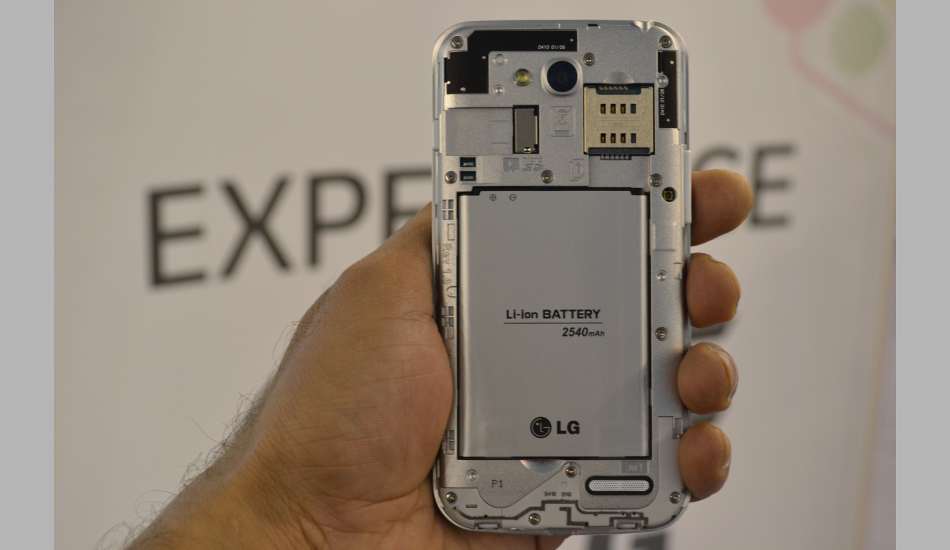
However the LG L90 comes with a bigger 2540mAh that is removable which is a great feature to have when you are travelling. The battery as you would expect can give you a little more battery backup than the Xperia M2.


SOFTWARE.

On the software side, we have two nice looking UIs with the Sony Xperia M2 running on Android 4.3 jellybean which is as said by the company will be updated to Android 4.4 Kitkat. On top of that, we have the Sony's Timescape UI which is simplistic and good looking but as the design, it is getting a little pale too!

The LG L90 however comes with the Android 4.4 KitKat out of the box with Lg's own UI on top of that!
The software of this particular phone comes with the popular KnockCode by which you can unlock or perform functions by knocking your phone's display which sounds like it is harmful for your display but the truth is that it is not! 
The Software decision totally depends on you, it depends on you which one you want!


PERFORMANCE.

In performance specs too, both phones with exactly similar specs that includes a 1.2 GHz Qualcomm Snapdragon 400 (MSM8226) quad core processor with Adreno 305 graphics processor and 1GB RAM.

Both the phones are similar in performance whether it is gaming or mulit-tasking and you would face no lags on either phone if you are not a heavy user.

Both the phones can handle games like Asphalt 8 or Riptide GP2!


CAMERA.

Even when it comes to camera, both the devices feature similar 8MP shooter with a single LED flash capable of shooting videos at 1080p.

The Sony Xperia M2 captures some decent shots with sufficient lighting while in low light, photos often come out grainy and unacceptable!

On the side, the LG L90 captures not-so-decent shots in sufficient light and in low light, you shouldn't really expect anything. The camera is surprisly not good given the great performers of LG!

In the Camera section, the Xperia M2 wins hands down with far better photographs than the LG L90.


TO SUM UP...

Both the phones are capable enough to be categorized as a decent budget phone, however the Sony Xperia M2 is lot more costlier than the LG L90. The features you will get by adding a buck load of money to the LG L90's price are NFC, USB OTG and a better camera. If you are okay with the conditions i mentioned, then you should go for the Sony Xperia M2 but my advice here will be that you should stick with the LG L90 or increase the budget and go for the Moto X/ HTC desire 816!


Also Read: Moto G vs LG L90!


Also Read: The HTC desire 816 vs The Moto X!


ONCE AGAIN THANK YOU FOR READING, IF YOU HAVE ANY MORE SUGGESTIONS OR QUESTIONS ON THIS ARTICLE , COMMENTS ARE ALWAYS WELCOMED OR YOU CONNECT ME ON TWITTER@phonesoldier or Facebook!
 DO MAKE SURE TO HIT THAT SHARE BUTTON IF YOU LIKED READING IT! 


Friday, May 2, 2014

Tablet battle: Apple Ipad Air vs Samsung Galaxy 10.1!

Choosing a Tablet is not really difficult as there are not that much choices to choose from especially when it comes to premium tablets that are big and hefty But there are some that can make you go nuts with their advantages and disadvantages.


So this is the tablet battle between the Feather weighed Ipad Air and the intensive Samsung Galaxy Note 10.1!


DESIGN AND BUILD.


Design and build is always a concern when you are looking for a tablet because that determines how long will you be able to hold it.

         
Build of a tablet should be comfortable enough that you would be able to hold it for long while gaming or anything else! Let's see how these two stack up in this category.


Both tablets borrow design cues from elsewhere in their respective ranges; in the case of the iPad Air, that means iPad Mini-style lines, complete with slimmed-down screen bezel. The Note, meanwhile, draws on the Galaxy Note 3's plastic leather-like design, complete with fake stitching on the back that is comfortable but is not premium as the price you are paying for it!


The Ipad Air as the same suggest is incredibly light weight when compared to its fellow competitors weighing at 469g or 478g, depending on whether you opt for the Wi-Fi only or cellular version.


While the Samsung Note 10.1 weighs at 540g which has a solid feel but comes with a little heft that feels a lot heavier when compared to the Ipad air!

The design of the Ipad Air feels a lot premium when compared to the leather feel of the Note 10.1 and the clear winner in this category is the Ipad Air.


DISPLAY, A TOUGH CHOICE TO MAKE!


When we talk about massive sized tablets ( 10-inches to be precise ), display sharpness is a must as you would probably watch a lot of movies or read books on it.


The note's 10.1 is gorgeous to look at, Its 2560 x 1600 screen blows the iPad Air's 2048 x 1536, 9.7in screen on paper, offering up 299ppi against the Air's 264ppi. Fonts are crisp, and it delivers wide viewing angles. And with multiple screen mode options, it's versatile, too.

But the case doesn't end here as the Air's Retina display may not match up in terms of pixel count, it's plenty sharp enough, though – and it has the edge over the Note when watching video, with (more) true-to-life colours and dynamic imagery.

The note's display may win on paper but when it comes to actual experience, the Ipad's retina display is the best and it is the winner in this category too.


HARDWARE.

When it comes to connectivity, both the tablets pack all the connectivity options available with the exception of the Ipad air not having an IR blaster.

You can buy third-party iPad styluses that simulate touch from fingers, but the Galaxy Note series is centered around its bundled S Pen stylus. Samsung threw in a ton of software goodies to take advantage of that pen, including quick note-jotting, screen grabbing and annotating, and handwriting recognition that are helpful a lot of times and is a great feature to have in a tablet.

Samsung Galaxy Note 10.1 (2014)

While you can get 128GB internal storage on the Ipad air which will cost you a couple of more bucks but on the Samsung Galaxy note 10.1, you can add storage up to 64GB via a Micro SD card. Internal memory of the note 10.1 is however limited to 32GB.


Battery life is not really a problem on either device and both can actually get you a time period of two days on moderate usage.


SOFTWARE.

Once again, we are here in the battle of IOS and Android but we are going to discuss it this time as software matters a lot when it comes to tablets.

On the Note 10.1 side, we have the Android jellybean 4.3 assisted with the Magazine UX that has a whole lot of features packed in, some are useful, some are frustrating and some are well, useless!

Samsung Galaxy Note 10.1 (2014)

Samsung packed its Magazine UX with widgets, including a specially-modified version of Twitter, the digital edition of Bloomberg's Businessweek+ and an impressive version of Flipboard which can be useful sometimes but you will eventually end up using Flipboard again.

The star attraction, though, is Samsung's Multi Window, letting you run Samsung and Google apps side by side. It's not new or fast in general but on this tablet, it is quite impressive if you avoid the lags. The multi window on this tablet actually uses the 10 inches display but it is not fluid and lags a lot.
Actually you won't really use more the two apps given that you can run six apps at a time on the display.

While on the other hand, we have the simpler and better looking IOS 7 which is not as a feature intensive as the Note 10.1 but you won't really regret it with the gestures letting you multi-task much easily and how can I forget how fast it is unlike the Samsung's Magazine UX.

Apple iPad Air

The decision of winner here totally depends on you, whether you want more features to play with or a simple and colorful UI!


PERFORMANCE.


The Galaxy Note 10.1 certainly has some impressive and top notch specs; a 1.9GHz quad-core processor, 3GB of RAM And that power is backed up by the benchmarks, too, with the Note managing a respectable score of 2871 on Geekbench 3.

That's a step ahead of the iPad Air's Geekbench score of 2696 – and it's not surprising, since the iPad's proprietary dual-core 1.4GHz A7 processor and 1GB RAM don't quite measure up to the Note's internals. That said, Apple's 64-bit processor is handily future-proofed, and app developers are slowly starting to optimize their wares for the extra headroom.

But it doesn't really matter what the specs look like on paper, the main competition comes when you use them both in real life.

On both the tablets, you will absolutely face no lags with the exception of Note 10.1 lagging while using the multi window function but when it comes to gaming or any heavy power sucker like the imovie on the Ipad, both the tablets perform extremely smooth and you can go for either one.


CAMERA.


You don't really look for a camera when you are buying a tablet except the front facing camera that you would use for video calls.

The Note 10.1 rocks a 8MP shooter with a 2MP front facing camera while the Ipad air rocks a 5MP rear facing camera with a 1.2MP front facing camera. You get the benefit of a LED flash on the Note 10.1 though.

Both the cameras are decent enough for occasional snaps or video calls.

The note 10.1 however wins on paper but snaps on both the device look almost similar.


TO SUM UP...

Both the tablets are capable enough of basically everything.

If you want more features as I said earlier, go for the Note 10.1 but if you are looking for a simpler UI and better and lighter design, go for the ipad air!


ONCE AGAIN THANK YOU FOR READING, IF YOU HAVE ANY MORE SUGGESTIONS OR QUESTIONS ON THIS ARTICLE , COMMENTS ARE ALWAYS WELCOMED OR YOU CONNECT ME ON TWITTER@phonesoldier or Facebook!
 DO MAKE SURE TO HIT THAT SHARE BUTTON IF YOU LIKED READING IT! 


Why you should buy the Sony Z1 Compact over the Iphone 5C!

9:40 AM Posted by phonesoldier , , No comments
Iphone 5C was not really appreciated by the crowd but it is still an Iphone and the customers want it but now there is another competitor which can stack up against it pretty easily and I am here talking about the Sony Z1 compact!

        iPhone 5C vs Sony Xperia Z1 Compact: The best 'baby brother' for you

A lot of people ask me which is the best compact phone out there and my answer always was Z1 compact but now here I am going to justify it by taking an in-depth look into the top 5 reasons for which the Sony Z1 compact is better than Iphone 5C!

MORE PREMIUM!

         Z1 Compact

While the Iphone 5 was a gorgeous and premium phone, Iphone 5C is not just comparable! Iphone 5C's plastic design looks cheap when you put it side by side with other phones. While on the other hand, the Z1 compact continuous the tradition of its predecessor with its sandwich design with a glass back and a far more premium design than the Iphone 5C.


BETTER CAMERA.

The cameras on all the Iphones are always praised with their great color reproduction and sharp macros but what happens when it battles face to face with  a 20MP shooter?

The 20MP camera on the Z1 compact is great with perfect and vibrant colors, sharp details and everything you would expect in a flagship camera. The camera on the Iphone 5C is not bad either as i said before but it is not the best and the Z1 compact just blows it off!

Z1 compact is actually one of the phones with the best camera in the market right now.


MICRO SD CARD SUPPORT.

What would it be like if you want to add more media to your phone and you just can't because your phone doesn't have a micro SD card?

This is the problem you will face in any Iphone out there because they all lack a micro SD card.
The Z1 compact actually solves this problem with its ability to increase the storage via a micro SD card ( expendable up to 64GB )

Now don't get me wrong, I know you can get more storage if you opt for the 32GB version of the Iphone 5C but you have to pay more for that and Z1 compact is already cheaper than the 16GB version.

BATTERY LIFE IS BETTER!

Battery life is always a concern when it comes to smaller high end phones as you would expect that they will come with a smaller battery but these both particular phones are not that bad!

When it comes to size, it is Iphone 5C 1510mAh battery vs Z1 compact 2300mAh battery.

By looking at the size, you would probably see a one sided battle and i should tell you that you are not wrong. The battery of Z1 compact is far better than the one on the Iphone 5C. The Iphone 5C will get you about 8-10 hours of heavy usage but the Z1 compact can get you a full day of that.

ROUGH AND TOUGH.

The plastic casing on the Iphone 5C is not as fragile as the Iphone 5S but it misses some features found on the Z1 compact.

The Z1 compact is IP67 certified that means it is water and dust proof, so if you want to take pictures or record videos underwater, the Z1 compact is a perfect choice.


TO SUM UP...

While the Iphone 5C tries to keep things simple and colorful, the Z1 compact is an intense phone and can perform various tasks that the Iphone 5C is not capable of.

So, if you want the best compact phone at a reasonable price, the Z1 compact is a clear choice.


ONCE AGAIN THANK YOU FOR READING, IF YOU HAVE ANY MORE SUGGESTIONS OR QUESTIONS ON THIS ARTICLE , COMMENTS ARE ALWAYS WELCOMED OR YOU CONNECT ME ON TWITTER@phonesoldier or Facebook!
 DO MAKE SURE TO HIT THAT SHARE BUTTON IF YOU LIKED READING IT! 


Thursday, May 1, 2014

IM battle: Facebook messenger vs Whatsapp!

9:53 AM Posted by phonesoldier , , No comments
Facebook Messenger and  Whatsapp are one of the biggest instant messaging services but there are some who use both of them and some who use only one but it is really hard to tell which one is better, so let's do something about it! I am going to tell you which one is better in this article by just pointing out the pros and cons of both the apps. Let us begin!


WHATSAPP IS NOT TECHNICALLY FREE!


Whatsapp messenger is free on IOS but on other operating systems, it is not technically free! You get the first year free but after that it is $0.99 for every year which is a real bummer for some. But sometimes whatsapp automatically gives you a year more for free or there are also some hacks on the internet which you can try, that's why i used the word "technically", while on the other end Facebook messenger is totally free!


YOU DON'T GET STICKERS ON WHATSAPP.


While some out there love emoticans, they are not really as attractive as the stickers which you don't get on Whatsapp! Emoticons are a great way to express your feelings but animated stickers look more vibrant and eye catchy which you do get on the Facebook messenger!


YOU CAN'T SEND VIDEOS ON FACEBOOK MESSENGER.

Sharing media is now a important part of our life as i see it whether it is an audio file, image or a video which is now available on almost all IMs but what you miss on the Facebook messenger is sending videos!
On Whatsapp, you can however send videos and Whatsapp will automatically compress it for you which is a nice feature to have!

FACEBOOK MESSENGER LOOKS MUCH MORE MODERN!

While I do appreciate the background wallpapers on Whatsapp, let's face it Whatsapp looks really ugly other than on IOS! Facebook messenger on the other side with its blue and white combination looks much more modern!


FACEBOOK MESSENGER REQUIRES A FACEBOOK ACCOUNT!

On Whatsapp, you can just simply add a number to your contacts and there it is on your favorites list if the person is using Whatsapp but on Facebook messenger, you require a Facebook account to log in and use it which can be annoying sometimes if you are not a Facebook user!


YOU GET FREE VOICE CALLS ON FACEBOOK MESSENGER!


On both whatsapp and facebook messenger, you get the ability to send audio notes but what you don't get on Whatsapp is the ability to call someone! However this feature of Facebook messenger is limited to Android and IOS but I hope it comes to other operating systems soon.


NO CHAT-HEADS ON WHATSAPP.


While working or doing anything else on your smartphone, if you get a new message on facebook messenger, you can just reply it using chat-heads right away without closing what you were doing which you miss on Whatsapp! On Whatsapp, you have to close what you were doing and open whatsapp to reply to that message.


YOU CAN'T SEND MUSIC FILES ON FACEBOOK MESSENGER!

You can as i said before send audio notes on both apps but on whatsapp, you get the benefit of sending music files already available on your phone like MP3 files which you miss on Facebook messenger!


TO SUM UP...

Both the messaging services are a great way to interact with your friends or family but on Facebook messenger, you get a friendly and good looking UI but if you like exchanging more media, Whatsapp is an obvious choice! It is up to you now which one to choose as you now know the pros and cons of both the services.


ONCE AGAIN THANK YOU FOR READING, IF YOU HAVE ANY MORE SUGGESTIONS OR QUESTIONS ON THIS ARTICLE , COMMENTS ARE ALWAYS WELCOMED OR YOU CONNECT ME ON TWITTER@phonesoldier or Facebook!
 DO MAKE SURE TO HIT THAT SHARE BUTTON IF YOU LIKED READING IT!